Tutix for schools

A live AI tutor for every student. Taught your way.

A live class with a multimodal AI tutor that talks with each student, sees their work as they do it, and remembers them with Cog+.

Coming soonTutix for schools is coming soon. Every class, name and figure drawn on this page is a sample.

Sample classYear 11 Mathematics, with Sage

  • It talks.

    Students speak and the tutor answers aloud, like a video call.Captions are there if a student wants them. It is a live voice conversation, not a chat box.

  • It sees.

    The whiteboard, worksheets and a shared screen.As pictures a few seconds after each change. There is no camera in either direction.

  • It remembers.

    Cog+ keeps where each student got stuck.So their next class starts with the tutor already knowing, and anything unfinished carries forward.

Five ways to share the stage.

A live class is not a chat box. The student and the tutor put the lesson on a shared stage, and the tutor sees what is on it.

Slides

Use the prepared lesson deck as the agenda.

What the student and the tutor each do
The student
Picks an answer, writes a draft, reveals a solution, steps through a worked example and can mark up a slide for themselves.
The tutor
Reads the slide and sees what the student picked or typed. It moves between slides, reveals the next step and points at what it is talking about.
Before class
Slides are drawn before class from the topic you set, and from your own sources if you choose to teach from them. Until it starts you can edit a slide, or add one, by asking the class assistant.

Lesson styles that lean toward it: Guided lesson, Exam prep
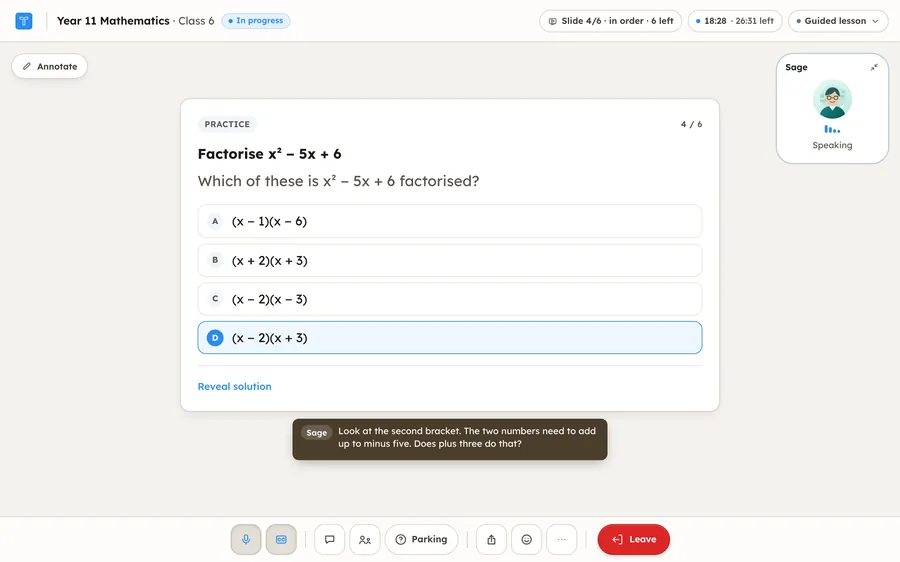
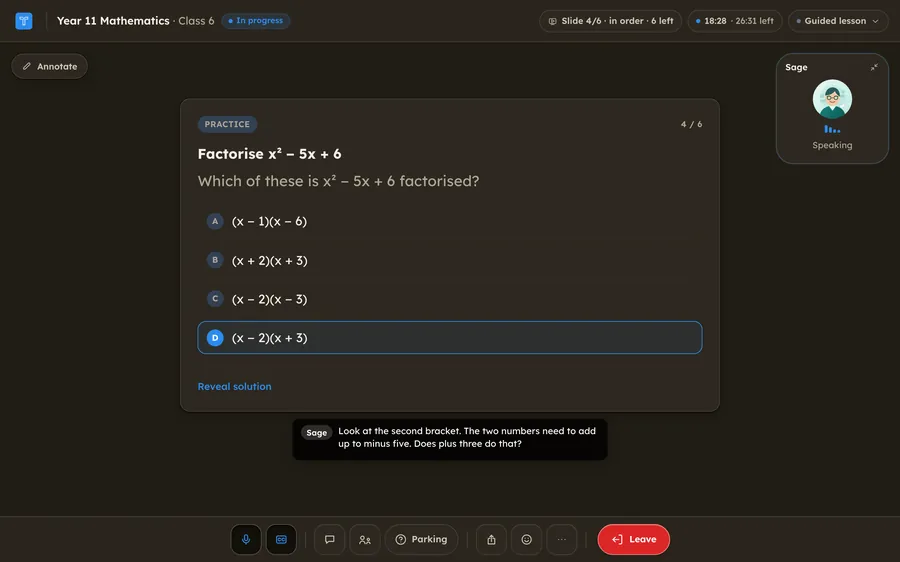
The live class on a practice slide, Factorise x squared minus 5x plus 6, with four possible answers and one picked. Sage, the tutor, is speaking and the caption reads: Look at the second bracket. The two numbers need to add up to minus five. Does plus three do that? The live class on a practice slide, Factorise x squared minus 5x plus 6, with four possible answers and one picked. Sage, the tutor, is speaking and the caption reads: Look at the second bracket. The two numbers need to add up to minus five. Does plus three do that?
Sample classYear 11 Mathematics, with Sage

Whiteboard

Work through problems like a shared notebook.

What the student and the tutor each do
The student
Writes, draws and adds shapes or pictures with pen, highlighter and text tools.
The tutor
Looks at a picture of the board a moment after the student stops writing, answers aloud and draws its own marks. It can not erase the student’s.
Before class
Choose the Practice-heavy lesson style when you set up a class that mostly works problems on the board.

Lesson styles that lean toward it: Practice-heavy
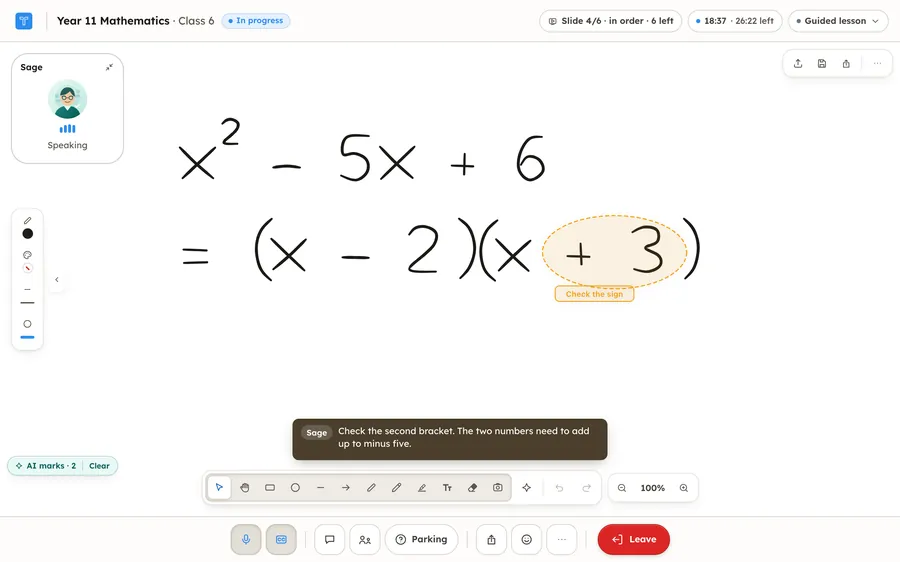
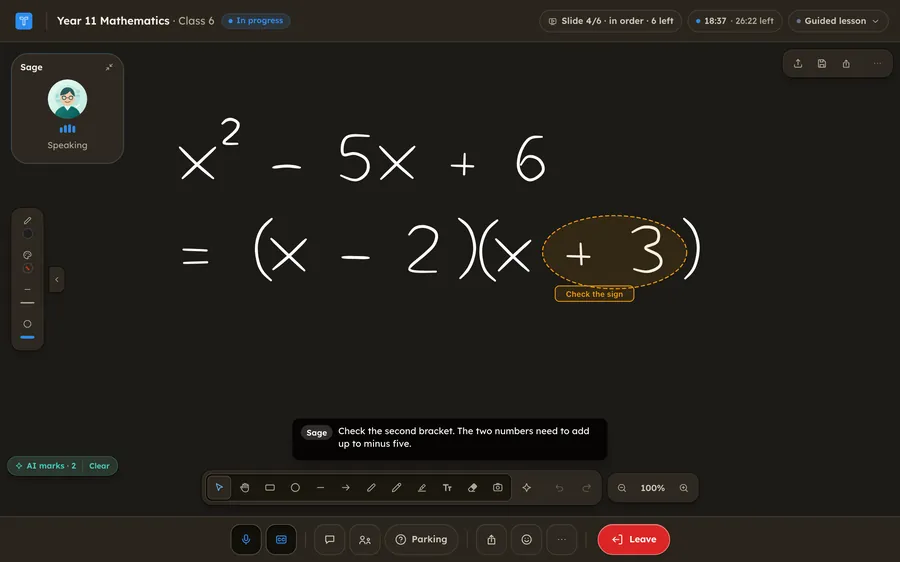
The shared whiteboard. The student has written x squared minus 5x plus 6 and, under it, the answer open bracket x minus 2 close bracket open bracket x plus 3 close bracket. Sage has drawn a dashed ring around the plus three, labelled Check the sign, and is saying: Check the second bracket. The two numbers need to add up to minus five. The shared whiteboard. The student has written x squared minus 5x plus 6 and, under it, the answer open bracket x minus 2 close bracket open bracket x plus 3 close bracket. Sage has drawn a dashed ring around the plus three, labelled Check the sign, and is saying: Check the second bracket. The two numbers need to add up to minus five.
Sample classYear 11 Mathematics, with Sage

Document

Write, revise, and keep shared class notes.

What the student and the tutor each do
The student
Writes class notes in a full editor. The notes stay with the student.
The tutor
Reads the notes and writes into them: sections, worked examples, corrections and highlights.
Before class
Choose Review or Writing feedback when you set up a class that works from notes and drafts.

Lesson styles that lean toward it: Review, Writing feedback
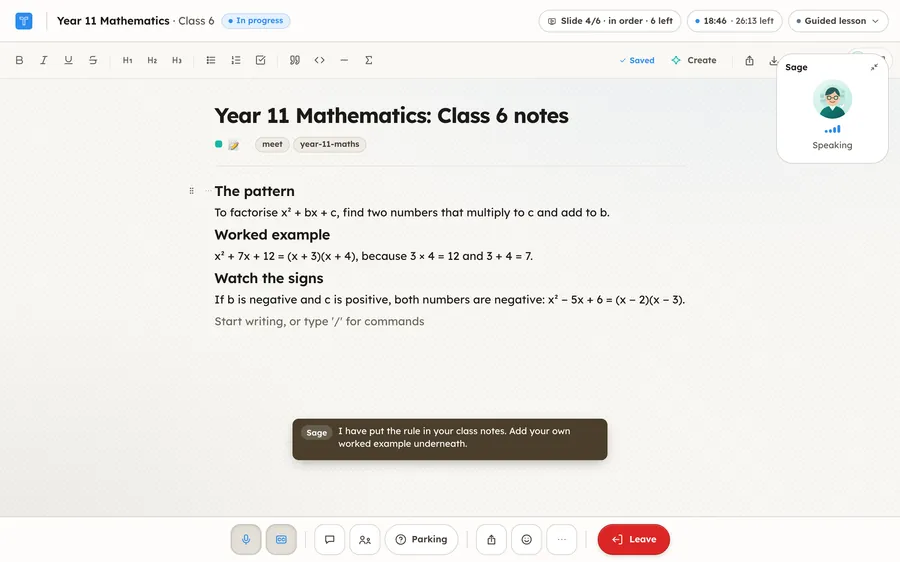
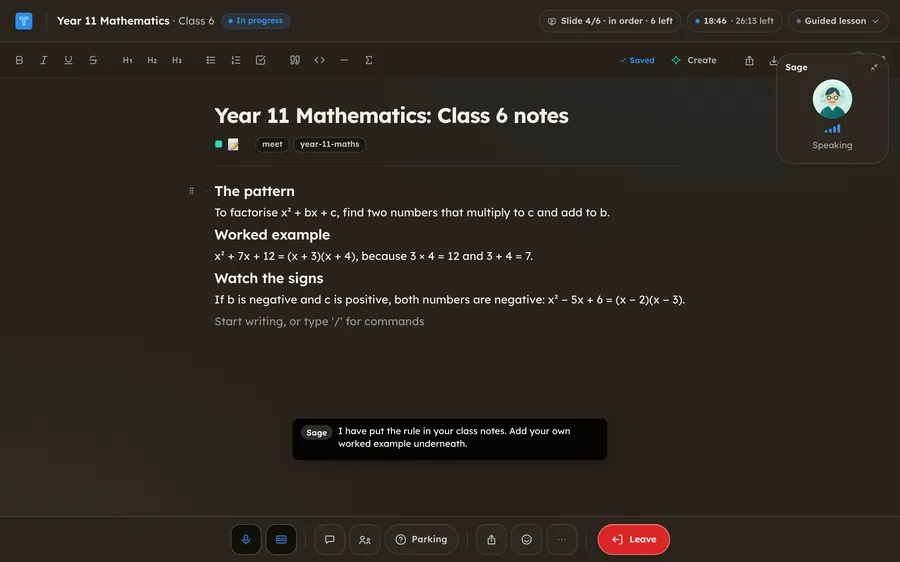
The class notes, titled Year 11 Mathematics: Class 6 notes, with three short sections: the pattern for factorising, a worked example, and a note about watching the signs. Sage is saying: I have put the rule in your class notes. Add your own worked example underneath. The class notes, titled Year 11 Mathematics: Class 6 notes, with three short sections: the pattern for factorising, a worked example, and a note about watching the signs. Sage is saying: I have put the rule in your class notes. Add your own worked example underneath.
Sample classYear 11 Mathematics, with Sage

Screen share

Let the tutor see a browser or app window.

What the student and the tutor each do
The student
Picks a browser tab, an app window or the whole screen to share, such as a worksheet or a web page, and stops whenever they like. Nothing is saved by default.
The tutor
Looks at a picture of what is shared every few seconds, with no audio, and points at what it sees in the room’s own preview. It can not click or type in it.
Before class
Choose Practical walkthrough when you set up a class that works through a task on screen. Desktop browsers only.

Lesson styles that lean toward it: Practical walkthrough
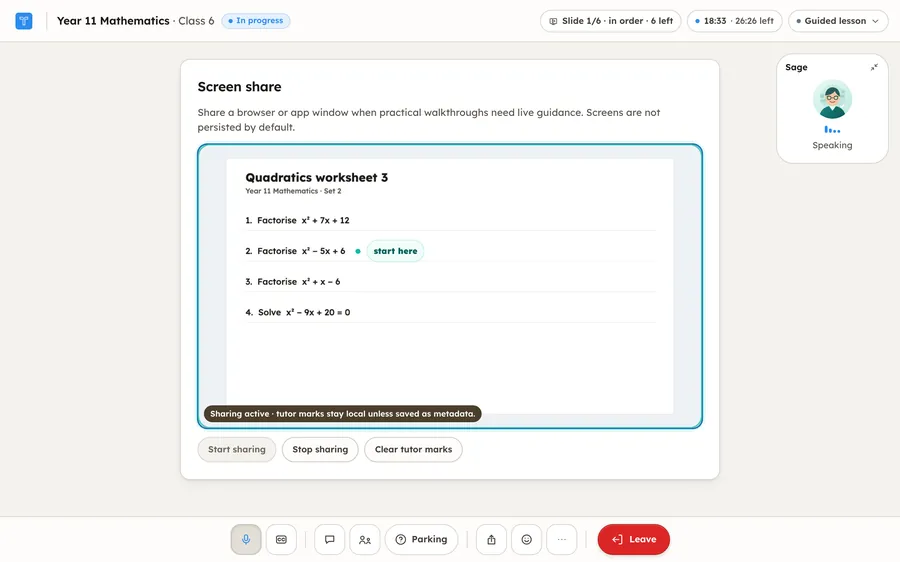
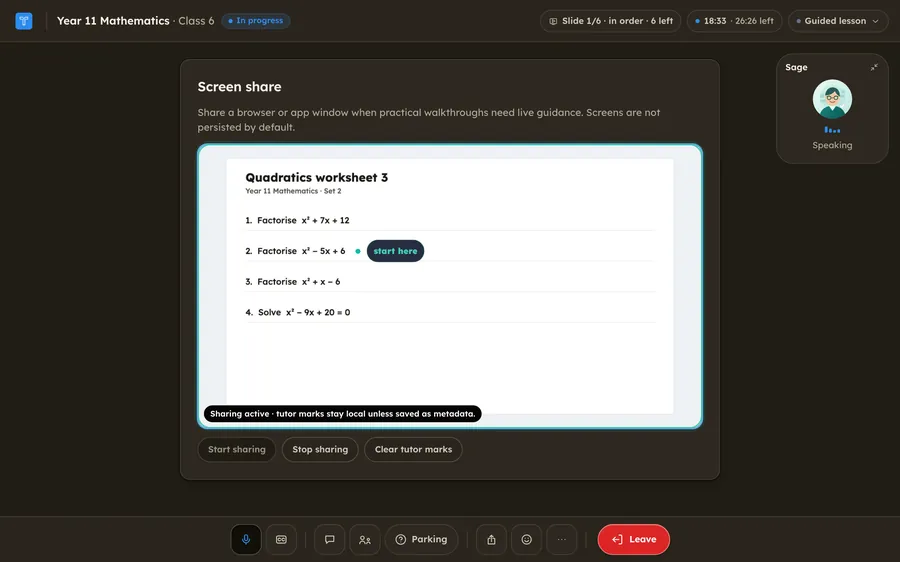
Screen share on. The student is sharing a worksheet, Quadratics worksheet 3, with four factorising questions. Sage has put a marker beside question two that reads start here, and its tile shows that it is speaking. Screen share on. The student is sharing a worksheet, Quadratics worksheet 3, with four factorising questions. Sage has put a marker beside question two that reads start here, and its tile shows that it is speaking.
Sample classYear 11 Mathematics, with Sage

Smart document

Upload a PDF, DOCX, or PPTX and mark it up together, page by page.
What the student and the tutor each do
The student
Uploads a PDF, Word or PowerPoint file, such as a worksheet or a past paper, and writes on it page by page.
The tutor
Reads the text of the page and sees it as the student does. It marks the page in its own ink: a circle, an underline or an arrow, with a short label.
Before class
Students bring the worksheet or paper. Marking against your own mark scheme is coming soon.
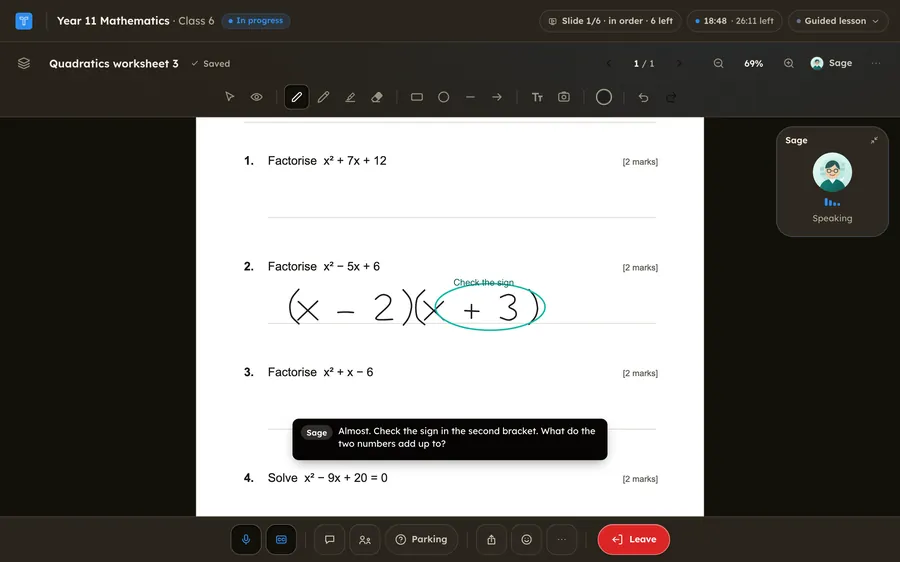
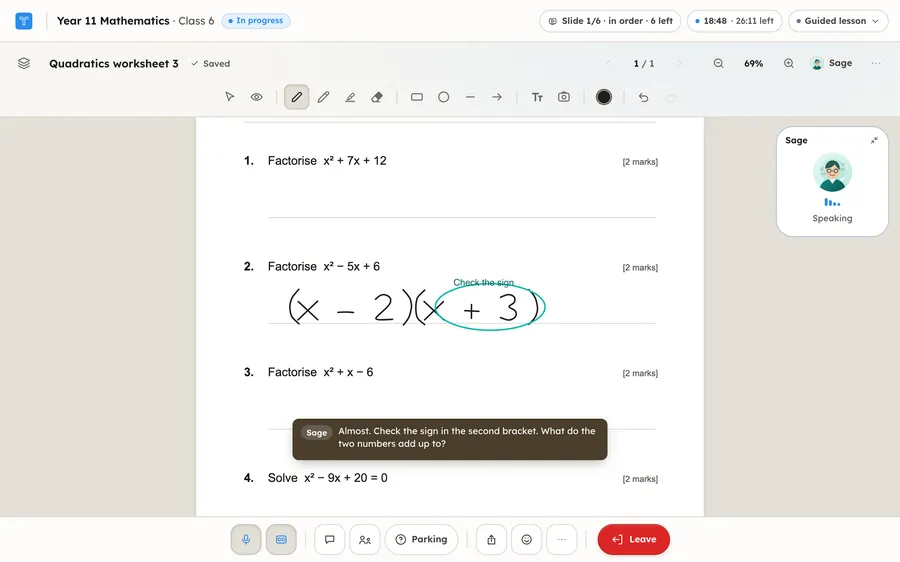
A worksheet page open in the live class. Under question two the student has written open bracket x minus 2 close bracket open bracket x plus 3 close bracket. Sage has circled the plus three in its own ink, labelled Check the sign, and is saying: Almost. Check the sign in the second bracket. What do the two numbers add up to? A worksheet page open in the live class. Under question two the student has written open bracket x minus 2 close bracket open bracket x plus 3 close bracket. Sage has circled the plus three in its own ink, labelled Check the sign, and is saying: Almost. Check the sign in the second bracket. What do the two numbers add up to?
Sample classYear 11 Mathematics, with Sage
The share menu, and the six lesson styles

One menu. Any time.

The student opens Share and picks what goes on stage. The tutor can change it too, when the lesson needs a different surface. Whatever is on stage, the tutor can see it and talk about it. There is no camera in either direction, and a student’s own marks on a slide stay private.
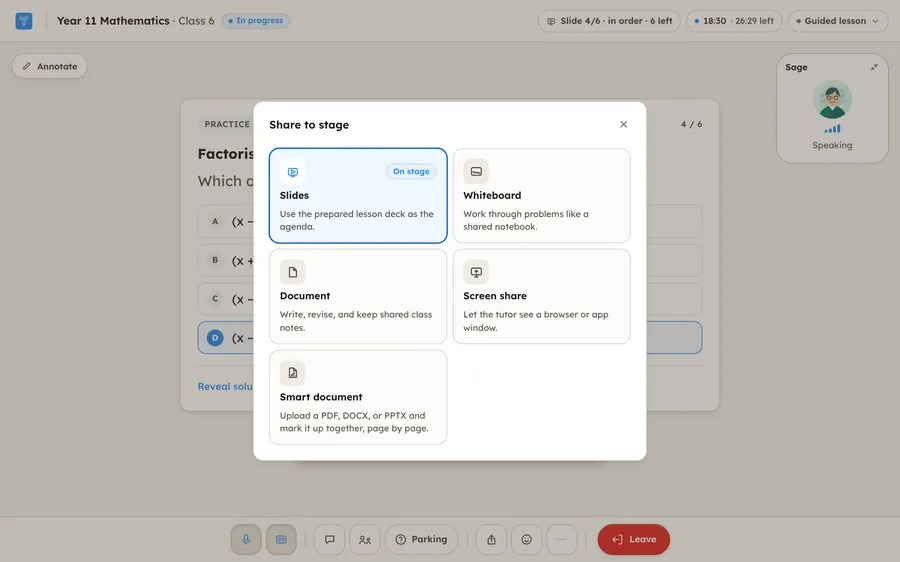
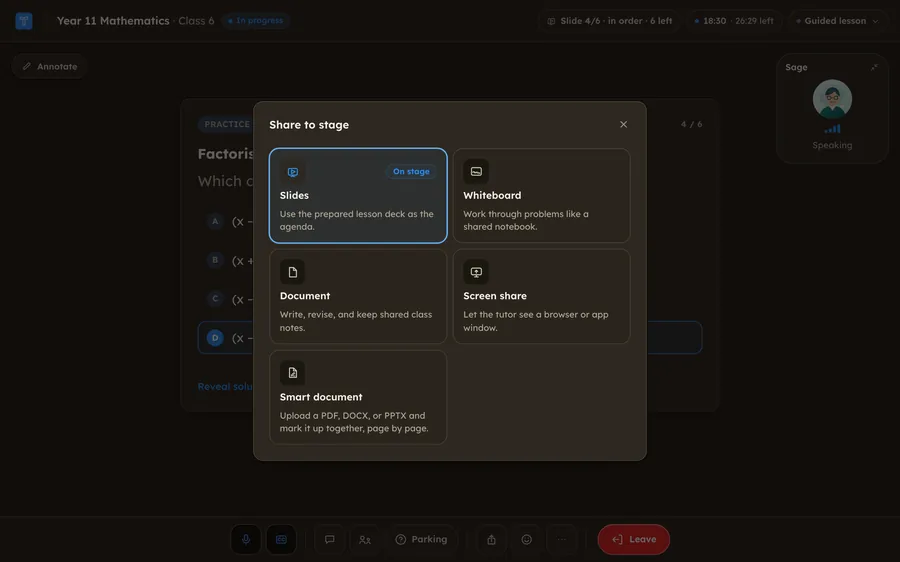
The Share to stage dialog in the live class: Slides, Whiteboard, Document, Screen share and Smart document, each with a line saying what it is for. Slides is marked On stage. The Share to stage dialog in the live class: Slides, Whiteboard, Document, Screen share and Smart document, each with a line saying what it is for. Slides is marked On stage.
Sample classThe Share to stage dialog

Pick the lesson style, class by class.

The lesson style is the rhythm the tutor teaches in. It leans toward the mode that suits it, and never locks one, so a student can still switch. Today it is chosen when a class is set up and can be changed from the top bar in the room.

Coming soonChoose which modes a class allows, and put a worksheet or past paper on the stage for every student.

9 features
  • A live voice class with a multimodal tutor, like a video call, with no cameraAvailable
  • Slides on the stage, with the tutor pointing and revealingAvailable
  • A shared whiteboard the tutor can see and markAvailable
  • Class notes the tutor writes into as you goAvailable
  • Screen share, so the tutor can see a worksheet or a web pageAvailable
  • Upload a PDF, Word or PowerPoint file and mark it up together, page by pageAvailable
  • Six lesson styles, from guided teaching to practical walkthroughsAvailable
  • Choose which share modes a class allowsComing soon
  • A worksheet or past paper put on the stage for the whole classComing soon
  • Guided lessonTutor leads in short explain-check-listen cycles.Slides
  • Practice-heavyMostly learner attempts, quick feedback, adjusted difficulty.Whiteboard
  • Exam prepTimed retrieval, command words, mark-scheme thinking.Slides
  • ReviewSlow recap, misconception repair, explain-back checks.Document
  • Writing feedbackSpecific critique and revision on the class document.Document
  • Practical walkthroughWorked examples or live screen guidance with handoffs.Screen share

One lesson, from plan to follow-up.

  1. The teacher sets the plan.

    Choose the sources, the week and how the tutor should teach. You test it as a student before anyone else sees it.

  2. Each student joins a live class.

    The tutor talks them through the plan aloud and sees their working as they write it.

  3. The tutor marks the working.

    It marks the slip on the page as the student writes, and the working it came from stays with the work.

  4. The teacher reads the brief.

    Where the class got stuck, what to teach next, and the evidence behind it.

Year 11 Mathematics, Set 228 students · Sample classroom

Topic
Quadratics, weeks 5 to 6
Tutor
Sage · hints first
Sources
  • Department notes v3 Approved
  • Paper 1, question 4 Approved
  • Worksheet 4 Approved

Practise factorisinglive with Sage · Sunday 19:30

  1. SageWhich two numbers multiply to 6 and add to −5?
  2. You said−2 and −3
  3. SageYes. Now write them as brackets on the board.
  4. You wrote(x − 2)(x + 3)

Paper 1 · Question 4[2 marks]

Factorise x² − 5x + 6

(x − 2)(x + 3− 3) 1/2

Both brackets are negative. The numbers multiply to +6 and add to −5.

Kept with the work · attempt 2 of 6

Class briefYear 11 Mathematics · Monday 08:10

Eight students wrote the wrong sign in the second bracket, and three did it twice. A two-minute worked example before Tuesday’s lesson should fix most of it.

Show the work
What each person gets: the teacher, the student and the school leader

The teacher

  • Set up classrooms and rosters, with co-teachers
  • Decide how the tutor teaches, and test it first
  • Read one brief a week, with the work behind it
  • Send a student a note through the tutor

The student

  • See this week’s plan and what is due
  • Practise with a tutor that uses your teacher’s method
  • See exactly what your teacher can see
  • Ask for a person at any time

The school leader

  • Manage staff, departments and access in one place
  • See adoption and coverage across the school
  • Set budgets and caps for each department
  • Keep each school’s data apart from every other school’s

What the tutor teaches, you decide.

Your material, cited.

Build a tutor from your notes, syllabus, worksheets and past papers. Showing the exact page in each answer is coming soon.

6 features
  • Tutors built from your own notes and papers, up to ten sources eachAvailable
  • Class slides drawn from your sources, when you choose to teach from themAvailable
  • Source packs with versions and approvalComing soon
  • Page-level citations in every answerComing soon
  • Keeping the tutor to the material you approvedComing soon
  • A report of what students asked that your sources do not coverComing soon

Sample answers Spoken in class, with captions on

You askedWhy do both numbers have to be negative?

The numbers multiply to +6, so they share a sign. They add to −5, so both are negative.

Department notes v3 · page 4

You askedWill this come up in the mock?

That is outside the material your teacher approved for this unit. Your teacher has been told.

Noted for your teacher

How it teaches, set once.

Choose the approach, the hints and when answers appear. Test it as a student before anyone else sees it.

6 features
  • Ask-first, hint-ladder or explain-first teachingComing soon
  • Rules for when answers are revealedComing soon
  • A lock during assessmentsComing soon
  • Tone, style and pace for each tutorAvailable
  • A plain tutor, set by the school for everyone or for a class, with no name, face or first-person phrasingComing soon
  • Preview as a student before releaseComing soon
SageYear 11 Mathematics Preview as a student

Approach

How do I factorise x² − 5x + 6?

Hint 1 of 3. Look at the last number. Which pairs multiply to give 6?

Hints
Up to 3
Reveal the answer
After an attempt
Reading level
Year 11
Name and face
Shown, or plain
Stay on topic
On
During assessments
Tutor locked

Your timetable, followed.

Plan the term, set the week, and let catch-up cover absences.

5 features
  • A term and week plannerComing soon
  • Deadlines and revision windowsComing soon
  • Make-up times after a missed sessionAvailable
  • Calendar feedsAvailable
  • Department templates and shared plansComing soon

Term 2 · Year 10 Science8 weeks · Sample plan

  1. Week 5Cells and microscopy
  2. Week 6Transport in cells
  3. Week 7Enzymes
  4. Week 8Revision and mocks
MonLearnDepartment notes
TuePractise6 questions
WedReviewCommon slips
ThuCatch up2 students
FriQuizIn class
Deadline Friday · 6 questionsRevision opens in week 8

Past papers, marked to your scheme.

Students practise by topic or sit a full paper, and the tutor marks the working on the page. Marking against your own mark scheme, with marks you can change, is coming soon.

6 features
  • The tutor marks a past paper on the pageAvailable
  • Practice by topic or command wordComing soon
  • Marking against your mark schemeComing soon
  • Teacher moderation of any markComing soon
  • Timed full-paper modeComing soon
  • Marks lost, by skillComing soon

Paper 1 · Question 7[3 marks]

Solve x² + 3x − 10 = 0

  1. (x + 5)(x − 2) = 0
  2. x = 5−5 or x = 2A0

Set each bracket to zero: x + 5 = 0 gives x = −5.

2/3

Mark scheme

  • M1Factorises correctlyAwarded
  • M1Sets each factor to zeroAwarded
  • A1Both solutions correctNot awarded

Marked by SageChange a mark

Cog+ remembers every student.

Where a student got stuck in a class becomes a small note called a cog. Cogs link, merge and fade, so the tutor starts each class knowing that student’s weak spots.

  1. It notices.

    Where a student got stuck in a class is kept as a small note called a cog.

    SampleMixed up the sign of the second bracket

  2. It remembers.

    Related cogs link, and repeated ones merge into one weak spot. Things a student has mastered fade, so the memory stays current.

    SampleFour sign slips became one weak spot worth a lesson

  3. It comes back to it.

    The next class starts with the tutor already knowing the student’s biggest weak spot, and any topic that was not finished carries forward.

    SampleThursday’s class picked up the unfinished factorising, with the sign slips in mind

What a teacher gets from it
  • Cog+ memory of where each student got stuck, carried into the next classAvailable
  • A weekly class brief with its evidenceComing soon
  • Misconception patterns across a classComing soon
  • Suggested revision groupsComing soon

How Cog+ works

Know what to teach next week.

Counted measures sit beside the tutor’s reading of them, and every reading opens onto the work behind it.

Year 11 Mathematics, Set 2

Seating plan · Sample classroom

  1. AO, practised
  2. BT, practised
  3. CW, needs a word
  4. DP, practised
  5. EK, needs a word
  6. FA, practised
  7. GM, not started
  8. HS, practised
  9. IK, needs a word
  10. JW, practised
  11. KL, practised
  12. LM, needs a word
  13. MB, practised
  14. NR, needs a word
  15. OD, not started
  16. PV, practised
  17. QA, practised
  18. RH, needs a word
  19. SJ, practised
  20. TK, needs a word
  21. UM, practised
  22. VC, needs a word
  23. WB, practised
  24. XN, not started
  25. YO, practised
  26. ZH, practised
  27. AB, practised
  28. CD, practised
  • Practised
  • Not started
  • Needs a word

Tutor’s readingClass brief · Monday 08:10

Eight students wrote the wrong sign in the second bracket. Three did it twice. A two-minute worked example before Tuesday’s lesson should fix most of it.

Show the work · 8 students
  • Chloe W.(x − 2)(x + 3− 3)
  • Elif K.(x − 3)(x + 2− 2)
  • Rhys H.(x − 2)(x + 3− 3)
  • and 5 more students
Your review Looks rightNot quiteDismiss

Counted this week

Finished the assignment
23 of 28
Practised at least once
25 of 28
On time
21 of 28
Wrote the wrong sign
8 of 28
Did it twice
3 of 28

In the product, every figure here is counted from the work.

A suggested group for Tuesday

Suggested group for Tuesday 8 students

  • CW
  • EK
  • IK
  • LM
  • NR
  • RH
  • TK
  • VC

Same slip, same fix. About ten minutes.Add to the plan

10 features
  • A weekly class brief with its evidenceComing soon
  • A seating-plan view of who needs a wordComing soon
  • Counted measures: completion, accuracy, hints, time and coverageComing soon
  • Misconception patterns across a classComing soon
  • A measure of how often students try before they askComing soon
  • A note to a student, delivered through the tutorComing soon
  • Suggested revision groupsComing soon
  • A timeline for each studentComing soon
  • Department and school roll-upsComing soon
  • Exports for parents’ evenings and reviewsComing soon

Every student, included.

Voice and text, captions and reading support, and a plain account of who can see what. No camera in either direction.

Paper 1 · Question 4[2 marks]

Factorise x² − 5x + 6

Sage · speaking

SageLook at the last number. Which pairs multiply to give six?

Captions Read aloud Larger text More time Ask for a person
Who can see what

Your teacher sees

  • Your practice and your results
  • A short summary of each session
  • A conversation only where your school’s policy allows, and you are told

School leaders see

  • Totals by department, year and class
  • Adoption, coverage and use
  • Never a conversation

Nobody at school sees

  • Your own Tutix study
  • Anything from before you joined
  • Anything from after you leave
Tutor voices, and a teacher’s own voice

Choose a voice for the class

  • Nova
  • Sage
  • Spark
  • Atlas
  • Pixel
  • Echo
  • Bolt

Or a plain tutor, set by your school, with no name or face. Coming soon

A teacher’s own voice Coming soon

  • Recorded only with the teacher’s written consent
  • Always told to students as an AI voice
  • Withdrawn by the teacher at any time
12 features
  • Seven tutor voices to choose fromAvailable
  • A teacher’s own voice, with their consentComing soon
  • Captions in live sessionsAvailable
  • Read aloudComing soon
  • Larger text, dyslexia-friendly text and high contrastComing soon
  • Extra time and pacingComing soon
  • Session time limits and break promptsComing soon
  • Explanations in a home languageComing soon
  • What your teacher can see, shown plainlyComing soon
  • A person, one tap awayComing soon
  • School and personal learning kept apartComing soon
  • Weekly updates for parentsAvailable

Your workspace, your rules.

Your own address and sign-in, permissions you set, and a budget with a cap. The workspace is coming soon to the Enterprise plan.

Your school’s name on it.

Every school will get its own tutix.ai address, its own name and its own sign-in. Type yours and see it written into the letter to staff.

9 features
  • Teacher and department accountsComing soon
  • Classrooms, with co-teachersComing soon
  • Students aged 10 and over, enrolled by the school with its consentComing soon
  • Your own tutix.ai addressComing soon
  • School name and brandingComing soon
  • Google Workspace and Microsoft Entra ID sign-inComing soon
  • Roster importComing soon
  • Roles and permissionsComing soon
  • An audit logComing soon

Your school

Letter to staff · Sample letter

Dear colleagues,

Our classes now use Tutix. Sign in with your school account at

yourschool.tutix.ai

using Google Workspace or Microsoft Entra ID. Only people with an account at our school can sign in. You will see your own classes, and students will see theirs.

Head of Digital Learning

Who can do what, written down.

Roles are set by the school and checked on every request. Leaders see totals. Teachers see their own classes. Nobody has access to everything by default.

Coming soon

Roles and permissionsApproved for the school · Sample page

Admin
Manages staff and sign-in, sets budgets and caps, approves tutor changes, and sees totals by department. Does not read conversations.
Department lead
Approves tutor changes, runs classrooms, reads class briefs and sees totals by department. Opens a conversation only under school policy.
Teacher
Runs their own classrooms and tutors, and reads their own briefs and evidence. Opens a conversation only under school policy.
Student
Sees their own work and their own conversations, and nothing else.

“School policy” means the school decides, the student is told, and every opening is logged.

Approved for the school

A budget with a cap.

The school’s tutoring is one bank of minutes. Set a cap, give departments their share, and be told before anything runs out.

4 features
  • Pooled allowancesComing soon
  • Department budgets, caps and alertsComing soon
  • Banked minutes, bought in bulk and assigned to students and classesComing soon
  • Invoices and purchase ordersComing soon

Invoice INV-0412

PO 4471 · September · Sample school

Invoice lines
Banked minutesAmount
230,400 minutes (3,840 hours) at $55 per 1,000$12,672.00
Total due$12,672.00

Assigned to students so far38% of the bank

  • Mathematics520 h
  • Science374 h
  • English237 h
  • History148 h
  • Computing108 h
  • Languages72 h

Minutes last 12 months from purchase. Unused minutes stay banked.

Everything in the plan, in one place.

77 features for schools. Available now, or coming soon to the Enterprise plan.

See all 77 features

Teach

  • Tutors built from your own notes and papers, up to ten sources eachAvailable
  • Class slides drawn from your sources, when you choose to teach from themAvailable
  • Source packs with versions and approvalComing soon
  • Page-level citations in every answerComing soon
  • Keeping the tutor to the material you approvedComing soon
  • A report of what students asked that your sources do not coverComing soon
  • Ask-first, hint-ladder or explain-first teachingComing soon
  • Rules for when answers are revealedComing soon
  • A lock during assessmentsComing soon
  • Tone, style and pace for each tutorAvailable
  • A plain tutor, set by the school for everyone or for a class, with no name, face or first-person phrasingComing soon
  • Preview as a student before releaseComing soon
  • A term and week plannerComing soon
  • Deadlines and revision windowsComing soon
  • Make-up times after a missed sessionAvailable
  • Calendar feedsAvailable
  • Department templates and shared plansComing soon
  • A live voice class with a multimodal tutor, like a video call, with no cameraAvailable
  • Slides on the stage, with the tutor pointing and revealingAvailable
  • A shared whiteboard the tutor can see and markAvailable
  • Class notes the tutor writes into as you goAvailable
  • Screen share, so the tutor can see a worksheet or a web pageAvailable
  • Upload a PDF, Word or PowerPoint file and mark it up together, page by pageAvailable
  • Six lesson styles, from guided teaching to practical walkthroughsAvailable
  • Choose which share modes a class allowsComing soon
  • A worksheet or past paper put on the stage for the whole classComing soon
  • The tutor marks a past paper on the pageAvailable
  • Practice by topic or command wordComing soon
  • Marking against your mark schemeComing soon
  • Teacher moderation of any markComing soon
  • Timed full-paper modeComing soon
  • Marks lost, by skillComing soon

Understand

  • A weekly class brief with its evidenceComing soon
  • A seating-plan view of who needs a wordComing soon
  • Counted measures: completion, accuracy, hints, time and coverageComing soon
  • Misconception patterns across a classComing soon
  • A measure of how often students try before they askComing soon
  • A note to a student, delivered through the tutorComing soon
  • Cog+ memory of where each student got stuck, carried into the next classAvailable
  • Suggested revision groupsComing soon
  • A timeline for each studentComing soon
  • Department and school roll-upsComing soon
  • Exports for parents’ evenings and reviewsComing soon

Include

  • Seven tutor voices to choose fromAvailable
  • A teacher’s own voice, with their consentComing soon
  • Captions in live sessionsAvailable
  • Read aloudComing soon
  • Larger text, dyslexia-friendly text and high contrastComing soon
  • Extra time and pacingComing soon
  • Session time limits and break promptsComing soon
  • Explanations in a home languageComing soon
  • What your teacher can see, shown plainlyComing soon
  • A person, one tap awayComing soon
  • School and personal learning kept apartComing soon
  • Weekly updates for parentsAvailable

Control

  • Teacher and department accountsComing soon
  • Classrooms, with co-teachersComing soon
  • Students aged 10 and over, enrolled by the school with its consentComing soon
  • Your own tutix.ai addressComing soon
  • School name and brandingComing soon
  • Google Workspace and Microsoft Entra ID sign-inComing soon
  • Roster importComing soon
  • Roster sync with school systemsComing soon
  • Roles and permissionsComing soon
  • An audit logComing soon
  • Safeguarding alerts to your leadComing soon
  • Content filtering, with monitoring reports for staffComing soon
  • Retention, export and deletion controlsComing soon
  • A data processing agreement and security packComing soon
  • Pooled allowancesComing soon
  • Department budgets, caps and alertsComing soon
  • Banked minutes, bought in bulk and assigned to students and classesComing soon
  • Invoices and purchase ordersComing soon
  • Automated account provisioningComing soon
  • Links to Google Classroom, Teams and your LMSComing soon
  • Your own domainComing soon
  • An API and webhooksComing soon

What it costs, roughly.

Every school gets a proposal built around its students, its features and its tutoring hours. This is where proposals start, in US dollars. For comparison, one hour with a private tutor typically costs $35 to $100.

Core

$18–$24per student, per month

  • 360 minutes of live tutoring a month for each student, pooled across the school
  • About $2.25 to $3.00 a 45-minute class, if every minute is used

Plus

$36–$45per student, per month

  • 900 minutes of live tutoring a month for each student, pooled across the school
  • About $1.80 to $2.25 a 45-minute class, if every minute is used

Banked minutes

$50–$75per 1,000 minutes

  • Buy minutes in bulk for the whole school and assign them to students and classes
  • Bigger purchases cost less per minute
  • About $2.25 to $3.38 a 45-minute class
  • Minutes last 12 months from purchase
Every option includes
  • Teacher and admin accounts
  • Classrooms, rosters and class briefs
  • School sign-in and your own address
  • Budgets, caps and invoices
  • Setup help and teacher onboarding

Try your numbers

100

Indicative only. From 500 students volume pricing applies, so the real figure is lower. Your proposal is the price.

Core
$1,800 to $2,400a month
Plus
$3,600 to $4,500a month

Tutoring works. It has been hard to give to everyone.

89

randomised trials of tutoring, reviewed together, found about 0.29 standard deviations of extra learning.

Nickow, Oreopoulos and Quan, American Educational Research Journal, 2024. This is the case for tutoring in general. It is not a result we are claiming for Tutix.

1,000+

people have completed a Tutix class.

Sample quotes

These quotes are samples, not from customers. We will replace them with words from schools, used with their permission.

I want a tutor that teaches my way and shows me where the class got stuck. That’s the part I never have time for.

Head of MathematicsSecondary schoolSample

It shows me the exact line where I went wrong, and it remembers for next time.

Year 12 studentA-level ChemistrySample

I get a short note after every class. For the first time I know what my son found hard this week, in words I understand.

Parent of a Year 10 studentIGCSE MathematicsSample

Register your interest. A person will reply.

We are registering schools for early access. Tell us who you are and how many students you have in mind.

Coming soonSchool accounts are not open yet.

What happens after you register
  1. Talk

    We learn your curriculum, your systems and the students you have in mind.

    You
    A call and a few documents
    We
    A proposal and a plan
  2. Pilot

    One department or year group, with real classes and a teacher who helps shape it.

    You
    Choose the classes and sources
    We
    Set up and stay close
  3. Review

    We look at the evidence together: what students did, what teachers read, what it cost.

    You
    Decide what to keep
    We
    Show the work behind every figure
  4. Expand

    More classes, then the school, with training for every teacher who joins.

    You
    Add classes and staff
    We
    Train, support and report

Your school

Anything else we should know?Optional

Please leave out personal information about students.

We will use your details to reply about Tutix for schools and to send release updates. You can ask us to stop at any time. Privacy Policy

Questions schools ask.

Visit the Help Centre
When can our school start?

We are registering schools for early access now. The school plan is in the later phases of development and should be out within the next month. Your proposal will say what is ready and when.

What does it cost?

Every school gets a proposal. As a guide, about $18 to $24 per student per month for Core and $36 to $45 for Plus, or banked minutes at $50 to $75 per 1,000, lower for bigger purchases and good for 12 months. Prices are in US dollars, with teacher and admin accounts included. Volume pricing applies from 500 students.

Will it just give students the answers?

By default the tutor gives hints before answers, though a student can ask for the solution or reveal it on a practice slide. Teacher rules for how many hints a student gets, for when an answer appears and for locking the tutor during assessments are coming soon.

What can teachers see?

Coming soon: practice and results, and a short summary of each session. A full conversation opens only where your school’s policy allows it, the student is told, and the opening is logged. School leaders see totals, never a conversation.

Does the tutor see our students?

It hears them when they speak, and it sees what they put on the stage: the whiteboard, a page of a worksheet or a window they share, as pictures a few seconds after each change. There is no camera in either direction. A student’s own notes on a slide stay private to them.

What are the limits today?

The live tutor speaks and understands English. Screen share needs a desktop browser, and the tutor sees a shared screen as pictures, not video.

What about England’s AI safety standards for schools?

We use the Department for Education’s generative AI product safety standards as our reference checklist: filtering and monitoring, hints before answers, session limits and a plain tutor your school can choose. Several are coming soon, and we do not claim certification. Your proposal says where each one stands.

Which ages is it for?

The school plan is for students aged 10 and over, enrolled by the school with its consent. It is coming soon. Individual Tutix accounts are for students aged 13 and over.

Is it accessible?

We aim for WCAG 2.2 AA and have not had an independent audit yet. Captions are available today. Larger text, read-aloud, dyslexia-friendly text, high contrast and extra time are coming soon.

How do students sign in?

Coming soon: with their school Google Workspace or Microsoft Entra ID account, on your own tutix.ai address. Roster sync, other providers and your own domain are coming soon too.

Can we use our own materials and past papers?

Yes, for a tutor you build today: up to ten sources, such as PDFs, documents and slides. Past papers and mark schemes need the right permissions from their publisher. Page-level citations and department source packs are coming soon.

Do students keep their own Tutix accounts?

That is the plan, and it is coming soon: school learning and personal study stay separate, and the school sees nothing from a student’s own study.

Which subjects and exam boards?

Any subject, taught in English. Tell the tutor your course and goals, or give it your own notes and papers, and it plans the series and follows what you teach, whatever the exam board. Ready-made exam-board syllabuses are coming soon.

Can we try it first?

You can try the student experience today with a free class, up to 45 live minutes a month. Memory across classes is lighter on the free plan. A pilot for your school can be part of the proposal.